Introduction: Why the HHKB Still Has a Cult Following in 2026
If you’ve spent any time in programming communities, you’ve probably heard whispers about the HHKB Professional Hybrid Type-S review It’s not just another keyboard—it’s a legend.
In this HHKB Professional Hybrid Type-S review, we’re diving deep into why this minimalist 60% keyboard continues to command a premium price of $300+ even in 2026. While flashy RGB boards and aluminum customs dominate the market, the HHKB quietly maintains its status as a “holy grail” for serious programmers.
At first glance, it looks… simple. Almost too simple.
But under that understated design lies a unique combination of Topre silent switches (45g), a UNIX-inspired layout, and a typing experience that many users claim they can never go back from.
So the real question is:
👉 Is this still the best 60% keyboard for programmers, or just an expensive niche product?
Let’s break it down.
Table of Contents
The Layout (H3): A Love-It-or-Hate-It UNIX Design
The HHKB layout is not designed for everyone—and that’s intentional.
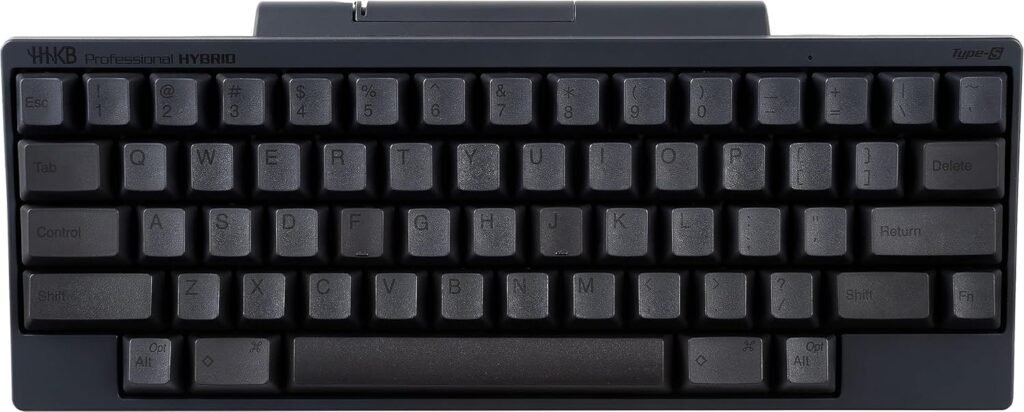
Unlike standard keyboards, the HHKB follows a UNIX-inspired design philosophy. Every key is placed with efficiency in mind, particularly for developers who rely heavily on shortcuts.
What Makes It Different?
- Control (Ctrl) replaces Caps Lock
- No dedicated arrow keys (layer-based instead)
- Minimalist 60% layout (no function row, no numpad)
- Compact, symmetrical key arrangement
Why Programmers Love It
The repositioned Ctrl key is the biggest selling point.
Instead of stretching your pinky awkwardly, your Ctrl key sits exactly where your finger naturally rests. For developers using shortcuts like:
- Ctrl + C
- Ctrl + V
- Ctrl + Z
This change alone can dramatically improve workflow speed.
Why Others Hate It
Let’s be honest: the HHKB Professional Hybrid Type-S review layout has a learning curve.
If you’re used to:
- Full-size keyboards
- Dedicated arrow keys
- Standard layouts
You’ll struggle at first.
But once muscle memory kicks in, many users claim it becomes second nature—and even superior.
The Typing Experience: Topre Silent Switches Explained
This is where the HHKB Professional Hybrid Type-S review truly shines.
The Topre silent switches (45g) are completely different from traditional mechanical switches. Instead of metal contacts, they use electrostatic capacitive switches, combining rubber domes with a spring mechanism.
What Does That Mean?
You get:
- A soft yet tactile bump
- A signature deep “thock” sound
- Smooth keypresses without scratchiness
- Reduced fatigue during long sessions
The Famous “Thock”
Unlike the sharp “click” of MX Blue switches or the clack of typical mechanical keyboards, HHKB Professional Hybrid Type-S review produces a muted, deep “thock”.
It feels premium. Controlled. Intentional.
And because this is the Type-S (Silent) version, it’s even quieter thanks to built-in dampening.
Topre vs Mechanical Switches (2026 Comparison)
Let’s address the big debate:
HHKB vs mechanical keyboards 2026
| Feature | Topre (HHKB) | MX Mechanical |
|---|---|---|
| Feel | Smooth + tactile | Varies by switch |
| Sound | Deep “thock” | Clicky / clacky |
| Fatigue | Low | Medium |
| Customization | Limited | High |
| Consistency | Extremely consistent | Depends on build |
Topre switches are less customizable—but far more refined out of the box.
Connectivity & Features
The HHKB Professional Hybrid Type-S review isn’t stuck in the past—it’s surprisingly modern.
Bluetooth 5.1 Multi-Device Support
You can connect up to 4 devices simultaneously and switch between them instantly.
Perfect for:
- Laptop + Desktop setups
- Tablet workflows
- Multi-OS environments (Windows, macOS, Linux)
USB-C Upgrade
Older HHKB Professional Hybrid Type-S review models used outdated ports, but the Hybrid Type-S now includes USB-C, making it:
- More convenient
- Faster for wired mode
- Future-proof
Battery Life
Runs on AA batteries and lasts months, not days.
This makes it extremely reliable for professional environments.
How it Compares to Customs
If you’re considering high-end keyboards, you’ve probably looked at custom builds.
The HHKB sits in a unique position between prebuilt convenience and enthusiast quality.
👉If you’re building a high-end setup, our GMMK Pro review explains everything you need to know, while our guide on the best 60% keyboards helps you choose a more compact option.
HHKB Professional Hybrid Type-S reviewvs Custom Mechanical Keyboards
Custom boards offer:
- Aluminum cases
- Hot-swappable PCBs
- Endless customization
But HHKB offers something different:
- A perfectly tuned typing experience out of the box
- No need for mods
- Consistency across every unit
If you don’t want to spend hours lubing switches or tuning stabilizers, HHKB is a “plug-and-play premium” option.
Build Quality: Why Plastic is Actually Better Here
At $300+, you might expect aluminum.
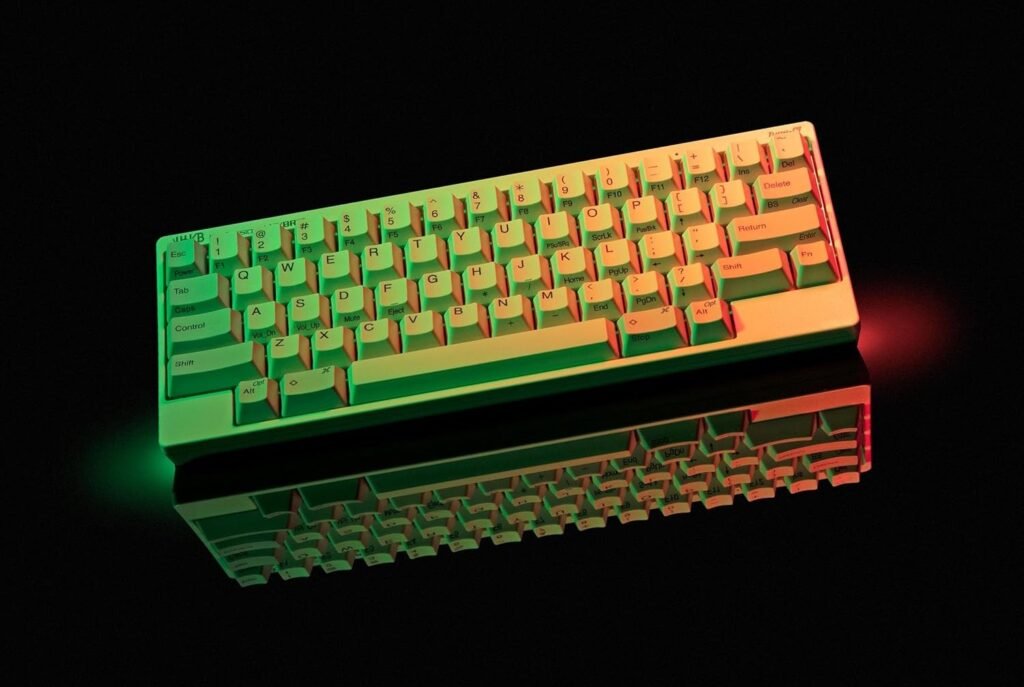
But HHKB intentionally uses high-quality PBT plastic—and there’s a reason.
PBT Keycaps
- Durable and long-lasting
- Resistant to shine
- Textured feel for better grip
No Metal Plate – And That’s a Good Thing
Unlike most keyboards, HHKB avoids metal plates.
Why?
Because it reduces:
- Vibration
- Harsh resonance
- Unwanted noise
This design choice enhances the Topre sound profile, making it cleaner and more controlled.
Lightweight but Premium
Despite being plastic, it feels:
- Solid
- Well-engineered
- Purpose-built
It’s not flashy—but it’s intentional.
Technical Specifications
For detailed specs and configurations:
Key highlights:
- Switch Type: Topre electrostatic capacitive (45g)
- Layout: 60%
- Connectivity: Bluetooth 5.1 + USB-C
- Keycaps: PBT
- Weight: ~540g
- Battery: AA
Pros and Cons
✅ Pros
- Exceptional typing experience
- Unique Topre silent switches
- Portable 60% design
- Long battery life
- Minimalist aesthetic
- Built for programmers
❌ Cons
- Expensive ($300+)
- Limited customization
- Steep learning curve
- No RGB or “gamer” features
- Plastic build may surprise new buyers
Verdict: Who Should Buy the HHKB?
The HHKB Professional Hybrid Type-S is not for everyone—and that’s exactly why it’s special.
Buy It If:
- You’re a programmer or developer
- You value typing feel over aesthetics
- You want a distraction-free setup
- You appreciate minimalist design
- You’re curious about electrostatic capacitive switches
Avoid It If:
- You love RGB and customization
- You prefer traditional layouts
- You’re on a tight budget
- You mainly use your keyboard for gaming
Final Thoughts
The HHKB isn’t trying to compete with mainstream keyboards.
It exists in its own category.
And once you understand it—you either join the cult… or walk away confused.
FAQ
1. Is the HHKB good for gaming?
It’s usable, but not ideal.
The lack of dedicated arrow keys and gaming-focused features makes it less practical compared to gaming keyboards.
2. How long does the battery last?
Battery life can last 2–3 months depending on usage, thanks to efficient Bluetooth and AA power.
3. Are Topre switches better than mechanical?
Not necessarily “better”—but different.
They offer a smoother, quieter, and more refined experience compared to standard mechanical switches.
4. Is the HHKB worth it in 2026?
If you’re a programmer looking for the best 60% keyboard for productivity, then yes—it’s absolutely worth it.
But for casual users, it may feel overpriced.