If you spend hours at your desk, your mouse matters more than you think. A lot more. After using dozens of mice over the years—from budget office options to high-end gaming gear—I’ve learned one thing: comfort and workflow efficiency beat flashy specs every time.
So where does the Logitech MX Master 3S stand in 2026?
After two weeks of daily use—editing articles, browsing, light design work, and even some casual gaming—I can confidently say this: the Logitech MX Master 3S review 2026 isn’t just about hype. It’s about refinement.
And yes, this might still be the best productivity mouse 2026 has to offer.
Table of Contents
Specifications Logitech MX Master 3S Review 2026
| Feature | Details |
|---|---|
| Sensor | Darkfield High Precision |
| DPI | Up to 8000 DPI |
| Connectivity | Bluetooth + Logi Bolt USB Receiver |
| Battery | Up to 70 days |
| Charging | USB-C Fast Charging |
| Buttons | 7 customizable buttons |
| Scroll | MagSpeed electromagnetic scroll wheel |
| Compatibility | Windows, macOS, Linux, iPadOS |
| Weight | ~141g |
Design & Build Quality
The first thing you notice is how intentional everything feels.
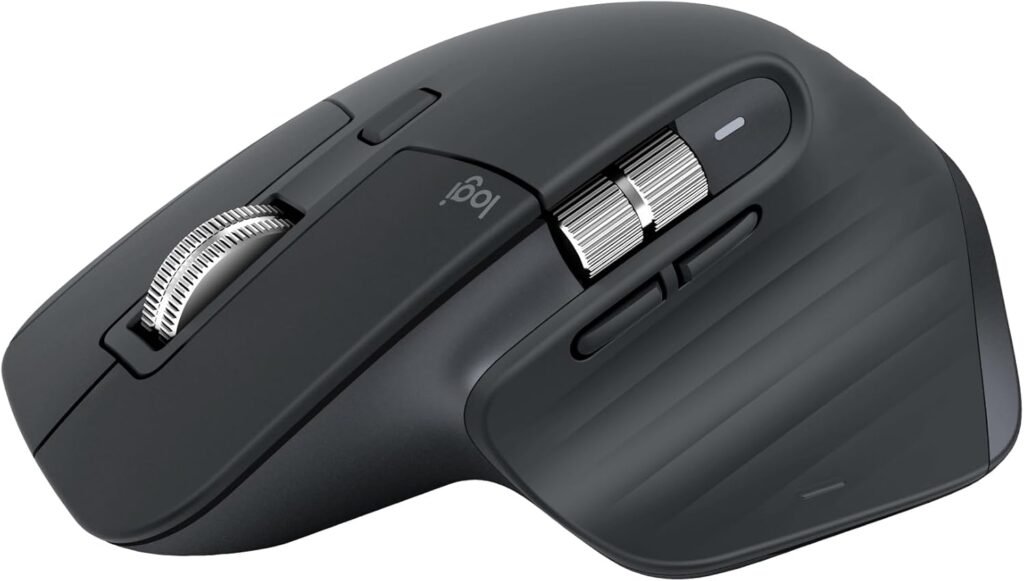
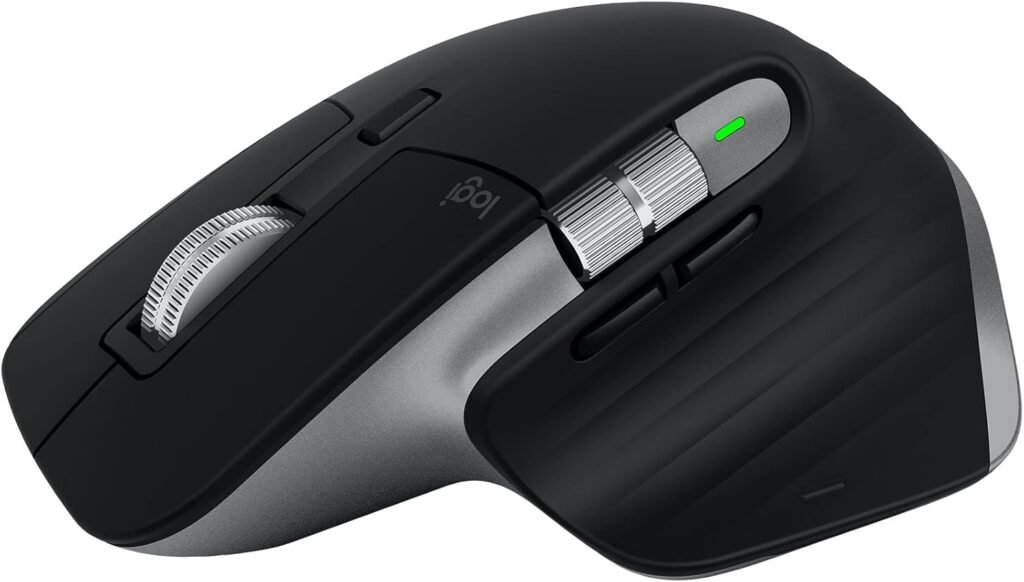
This isn’t a flashy mouse. It’s not trying to look like a spaceship. Instead, it focuses on ergonomics and subtle premium touches.
The shape hugs your hand naturally. Your thumb rests perfectly in the side groove. After long sessions, I didn’t feel that usual wrist tension I get from smaller mice.
The materials also feel top-tier. Soft-touch plastic covers most of the surface. It resists fingerprints well and doesn’t feel slippery. The scroll wheel? Solid metal. Cold to the touch. Smooth. Precise.
Buttons are quiet—very quiet. Logitech claims “90% less noise,” and honestly, I believe it. If you work in shared spaces or record audio, this matters.
One thing to note: this mouse is designed for right-handed users only. Lefties are out of luck here.
If you’re building a clean, efficient workspace, pairing this mouse with a good keyboard is key. I tested it alongside the Logitech MX Keys S review, and together they create a seamless productivity setup.
Performance — Where It Really Shines
Let’s talk about the real reason people buy this mouse.
Performance.
This is where the Logitech MX Master 3S Review 2026 becomes interesting.
Tracking & Precision
The 8000 DPI sensor is a big upgrade from previous models. You don’t always need that level of sensitivity, but it gives flexibility—especially on high-resolution monitors.
I tested it on:
- Glass surface (yes, it works)
- Wooden desk
- Mouse pad
No issues. No jitter. No weird tracking.
Scrolling Experience
This is the standout feature.
The MagSpeed scroll wheel switches between two modes:
- Ratchet mode for precise scrolling
- Free-spin mode for flying through long pages
And it switches automatically depending on how fast you scroll.
It sounds small, but once you get used to it, going back to a regular mouse feels painful.
Editing long documents or browsing endless tabs becomes faster. Much faster.
Workflow Efficiency
This mouse is built for multitasking.
You get:
- Horizontal scroll wheel (great for timelines and spreadsheets)
- Gesture button for shortcuts
- Multi-device switching (up to 3 devices)
I used it across a laptop, desktop, and tablet. Switching was instant.
If your work involves writing, editing, or content creation, this mouse speeds things up in ways you don’t expect.
Software & Features
The hardware is great. But the software is what unlocks the full experience.
Logitech uses Logi Options+, and it’s surprisingly powerful.
Customization
You can assign:
- App-specific shortcuts
- Gesture controls
- DPI settings
- Button remapping
For example:
- In Chrome → thumb button = open new tab
- In Photoshop → thumb wheel = zoom
- In Premiere Pro → horizontal scroll = timeline control
This level of customization makes the mouse feel tailored to your workflow.
Flow Feature
This is underrated.
Logitech MX Master 3S Review 2026 Flow lets you move your cursor between computers. Yes, literally drag files from one device to another.
It works over the same network. Setup takes a few minutes.
Once it’s working, it feels like magic.
Battery Life
Logitech MX Master 3S Review 2026 Battery life is excellent.
- Up to 70 days on a full charge
- 1-minute charge = several hours of use
I charged it once during testing. That’s it.
USB-C is a welcome upgrade. No more outdated cables.
Pros & Cons
Pros
- Exceptional ergonomics for long sessions
- Ultra-quiet clicks
- Best-in-class scroll wheel
- Works on almost any surface
- Powerful customization software
- Multi-device support
- Long battery life
Cons
- Not suitable for left-handed users
- Slightly heavy (not ideal for gaming)
- Premium price
- Learning curve for gestures
Who Is This For?
This Logitech MX Master 3S Review 2026 isn’t for everyone.
It’s not designed for competitive gaming. It’s not ultra-light. It’s not cheap.
So who should buy it?
Perfect for:
- Content creators
- Writers and bloggers
- Programmers
- Office professionals
- Remote workers
If your job involves sitting at a desk for hours, this Logitech MX Master 3S Review 2026 will genuinely improve your daily experience.
If you’re building a full productivity setup, you might also want to check out these best desk setup ideas for productivity to maximize comfort and efficiency.
Not ideal for:
- FPS gamers
- Left-handed users
- People on a tight budget
Real-World Experience (After 2 Weeks)
Here’s the honest part.
At first, the Logitech MX Master 3S Review 2026 felt… big.
If you’re coming from a smaller mouse, it takes a few days to adjust. The weight is noticeable too.
But after about three days?
I didn’t want to go back.
Scrolling became addictive. The silent clicks made late-night work easier. The shortcuts saved time every single day.
It’s one of those products that doesn’t feel essential—until you use it.
Final Verdict — Is It Still Worth It in 2026?
So, is it worth it?
Short answer: yes.
Long answer: if productivity matters to you, absolutely.
The Logitech MX Master 3S isn’t trying to be everything. It focuses on doing one job extremely well—making your workflow smoother.
It’s not perfect. The price is high. The design isn’t universal. And gamers will want something lighter.
But for everyday work?
This is still the best productivity mouse 2026 has to offer.
And after testing it thoroughly, I can say this without hesitation: it earns its reputation.